Residence card photo for Poland: 684×883 JPG rules and taking it on a phone
One JPG file, at least 684×883 px, under 2.5 MB, on a plain light background with your face filling 70–80% of the height. Here is what MOS checks on upload, what the office checks later, and how to turn a phone photo into the finished file.
For a residence card (karta pobytu) application in MOS 2.0, all you need is a single JPG file. It has to be at least 684×883 pixels in a 35:45 aspect ratio (the same proportions as a 35×45 mm print), stay under 2.5 MB, and be taken within the last 6 months. Your face needs to fill 70–80% of the height against a plain, light background, with a neutral expression, closed mouth and open eyes.
Beyond the basics, dark or tinted glasses are only allowed if you have a visual impairment and attach a disability certificate (or your own signed declaration if you don't have one). Headwear is accepted only for religious reasons, provided your face stays fully visible and you include a declaration of religious affiliation. Children have to meet the exact same size and background rules as adults. None of this requires a trip to a studio: take a sharp phone photo against a plain wall facing a window, and we'll crop it to 684×883 px, replace the background with white and run the portal checks so the file is ready for MOS.
Karta pobytu photo requirements in one table
MOS runs automated checks on the first three rows as soon as you attach the file. Everything below that is reviewed by a clerk at the voivodeship office (urząd wojewódzki) after submission, and by then you can't replace the photo yourself until they write to ask for a new one.
| What they check | Rule | What happens if it fails |
|---|---|---|
| Format | JPG | MOS refuses PNG, HEIC (the iPhone default) and PDF straight away. |
| Dimensions | At least 684×883 px (35:45 ratio, matching 35×45 mm) | The portal blocks anything smaller. A normal 4:3 phone shot or a square crop won't fit 35:45 and has to be reframed first. |
| File size | Up to 2.5 MB | The upload fails. Uncompressed originals from modern phones often exceed this limit. |
| Age | Taken within the last 6 months | The office asks you to send a recent photo. An old file from a 2022 PESEL UKR registration won't pass. |
| Face and framing | Showing you from the top of the head to the upper shoulders, with your face filling 70–80% of the height; looking straight ahead, eyes open, mouth closed, neutral expression | A waist-up shot, open smile or tilted head triggers a formal defect notice (wezwanie do uzupełnienia braków), giving you at least 7 days to send a replacement. |
| Background | Plain, light and even, with no shadows or objects | A shadow behind your head, patterned wallpaper or a door handle in the corner can get the photo flagged. |
| Glasses | No dark lenses; eyes and pupils clearly visible | Glare hiding an eye triggers a defect notice. Dark lenses are accepted only for a visual impairment, backed by a disability certificate or your own declaration. |
| Headwear | None, unless worn for religious reasons with your full face visible and a declaration of religious affiliation | A cap, hood or wide headband means sending a new photo. |
| Image quality | Sharp, in colour, natural skin tone, no filters or damage | Heavy skin smoothing, shifted colour balance or a blurry screenshot will fail review. |
For the full rules and the legal basis under regulation Dz.U. 2026 item 553, see our MOS 2.0 photo requirements guide. If you're wondering where those exact pixel numbers come from, we explain the calculation in photo 684×883 pixels for MOS.
How to take a residence card photo at home in 3 steps
- Stand against a smooth, light wall facing a window in daylight. Overhead lights cast a shadow behind your head; daylight from a window doesn't. Ask someone to take the photo with the phone's rear camera from about a metre away, held at eye level, leaving plenty of empty wall around your head and shoulders so we have room to crop.
- Keep a relaxed, neutral face with your mouth closed, hair brushed off your forehead and eyes, and take off your glasses and any headwear. Zoom in on the photo in your gallery to check that your eyes are sharp. If they look even slightly blurry, shoot it again, because no tool can rescue an out-of-focus original.
- Upload the original file straight from your gallery (never a screenshot or a copy sent via a messaging app like WhatsApp or Telegram) to mosfoto. We crop it to 684×883 px, replace the background with clean white, convert HEIC to JPG under 2.5 MB, and check that your face covers 70–80% of the height. Download the finished JPG and attach it to your MOS application.
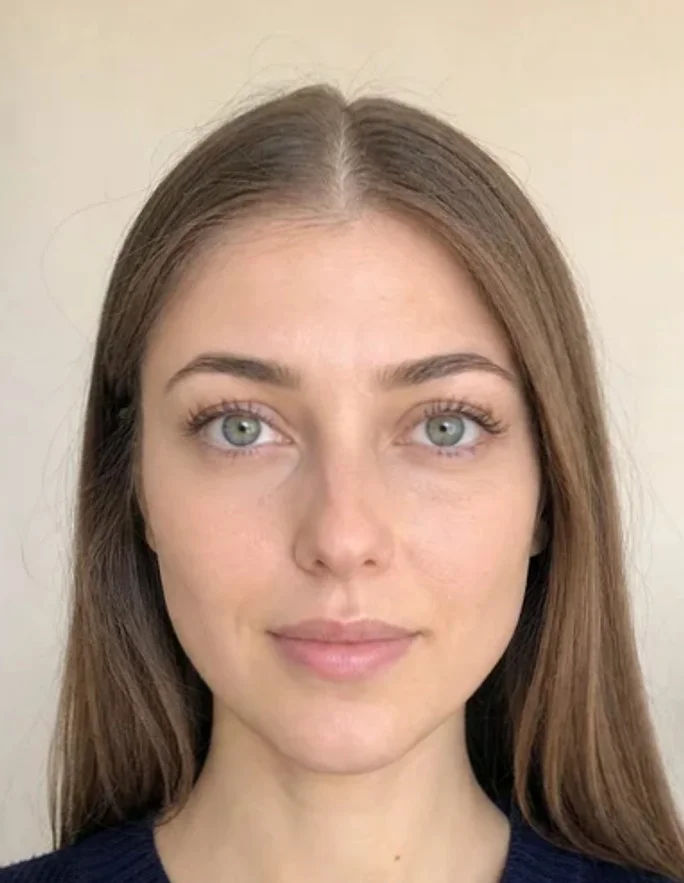
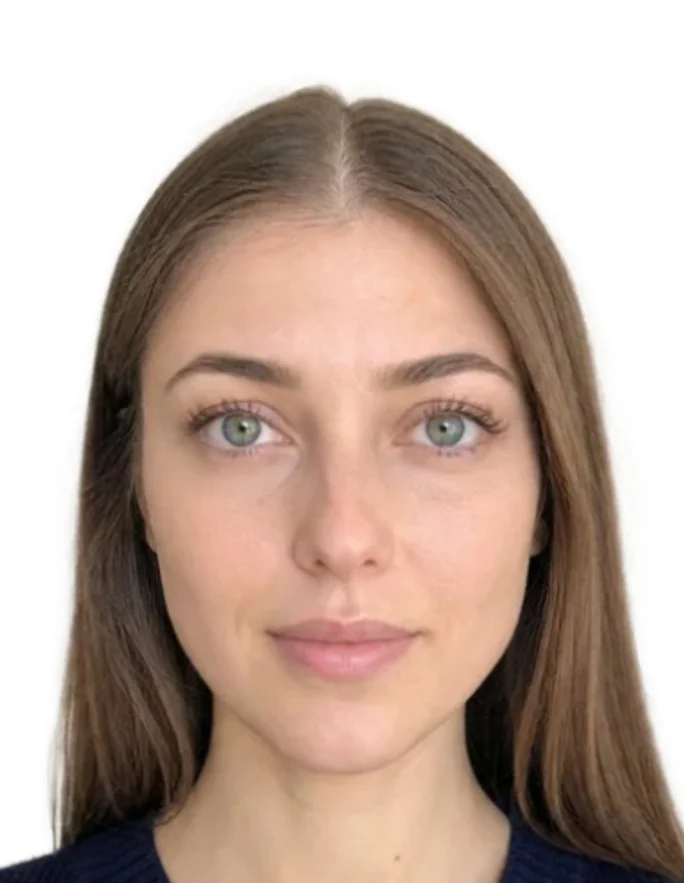
If you want visual examples for every stage, see our longer guide on how to take a karta pobytu photo at home.
Studio, do it yourself, or mosfoto
In Warsaw, a photo studio usually charges 30–50 PLN for a strip of printed photos you can't even upload to MOS, and some charge extra if you want the digital file too (ask specifically for a 684×883px JPG if you go). Doing it yourself in an image editor costs nothing, though you're on your own for the 35:45 crop, clean background removal and checking whether your face covers 70–80% of the height. Here on mosfoto, one payment of 19 zł gives you up to 10 tries over 7 days, and we refund you if the voivodeship office rejects the photo. We compared other apps and options in karta pobytu photo tools compared.
Why the office rejects photos
MOS lets through any JPG that clears the basic size and pixel checks, so framing or lighting issues only surface weeks later when a case officer opens your application.
- Shadows behind your head or across one side of your face, usually from ceiling lights or uneven side lighting.
- A face that's too small in the frame: shots taken from two metres away showing your waist leave your face covering closer to half the height instead of 70–80%.
- Smiling with your teeth showing, tilting your head or looking slightly to the side. Your eye line needs to stay level with the top edge of the frame.
- A fringe covering your eyebrows or loose strands falling over an eye. Both eyes have to be completely visible.
- An old or over-compressed photo, such as a 2022 PESEL UKR file, a crop from a passport scan, or a picture forwarded through a messaging app until it turns blurry.
We break down each issue with side-by-side examples and fixes in 5 karta pobytu photo mistakes.
Frequently asked questions
Does the same photo work for the CUKR card?
Yes. CUKR applications go through the same MOS portal under the exact same photo rules, so one file works for both. For the full CUKR details, see our CUKR card photo guide.
Does a child's photo have the same requirements?
Yes. Neither the regulation nor the Office for Foreigners (Urząd do Spraw Cudzoziemców) FAQ sets separate specs for children: you still need a JPG at the same pixel dimensions, on a light background, with the face filling 70–80% of the height. Only in justified cases, such as young babies, do the rules allow closed eyes, an open mouth or a different expression. Practical tips for photographing babies and preschoolers are in our child residence card photo for Poland guide.
Can I reuse my PESEL UKR photo or one from two years ago?
No. Your photo has to be taken within 6 months before you file, and older PESEL UKR files are usually smaller than 684×883 px anyway. Taking a new phone photo takes five minutes and saves you from getting a formal defect notice later.
Can I wear glasses?
Ordinary prescription glasses are fine, as long as your eyes and pupils are clearly visible with no glare on the lenses. Dark or tinted lenses are only allowed if you have a visual impairment and attach a disability certificate (or your own declaration if you don't have one). Taking your glasses off is still the simplest way to avoid glare.
How do I check if a photo is 684×883 pixels?
Open the file details: right-click Properties on a computer, or check the info screen in your phone gallery. The width must be at least 684 px and the height at least 883 px, in a 35:45 ratio. Any file from mosfoto is already 684×883px, so you don't have to check it yourself.
How much does a residence card photo cost?
A photo studio in Warsaw usually charges 30–50 PLN for a set of prints, and some charge extra for the digital file. On mosfoto, the finished file costs 19 zł, covering up to 10 versions within 7 days, with a refund if the office rejects your photo.
Sources
- Office for Foreigners: MOS, questions and answers
- Office for Foreigners: CUKR residence card, questions and answers (Polish)
- Regulation of the Minister of the Interior of 10 April 2026 on the temporary residence application (Dz.U. 2026 item 553, Polish)
- Pomorskie Voivodeship Office, Foreigners Department: Biometric photos (Polish)